

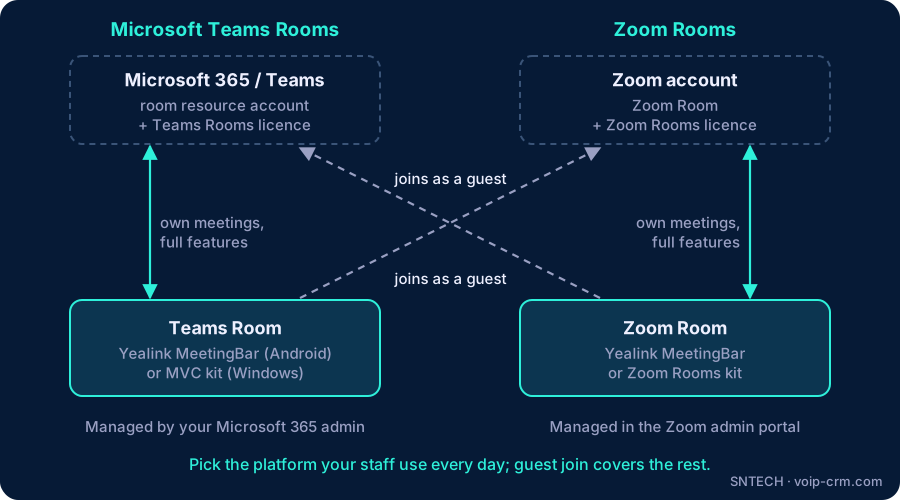
In the Microsoft Teams Rooms vs Zoom Rooms choice, pick the platform your staff already use every day: Teams Rooms if your company runs on Microsoft 365 and meets on Teams, Zoom Rooms if your team and clients mostly meet on Zoom. Both give you one-touch meetings, and both can join the other platform’s meetings as a guest, so the decision is about daily convenience and management, not about being locked out.
This article compares the two for a typical UAE office and shows the Yealink options for each. If you have already chosen Teams, our Teams Room setup checklist covers the parts you need.
What a meeting room platform actually does
Teams Rooms and Zoom Rooms are software made for shared meeting rooms. They run on a certified device in the room and give staff the same simple screen every time:
- Today’s meetings for that room, taken from the room calendar
- A one-tap “Join” button on the table console
- Content sharing from a laptop, by cable or wirelessly
- Camera, microphone and volume controls everyone can find
The hardware (camera, microphones, speakers, console) comes from makers such as Yealink, Logitech and Poly. The platform and its room licence come from Microsoft or Zoom.
Microsoft Teams Rooms vs Zoom Rooms at a glance
| Question | Microsoft Teams Rooms | Zoom Rooms |
|---|---|---|
| Best fit | Companies on Microsoft 365 that meet on Teams | Companies whose staff and clients mostly meet on Zoom |
| Room identity | Microsoft 365 resource account with its own calendar | Zoom Room set up in your company Zoom account, linked to a room calendar |
| Room licence | Microsoft Teams Rooms licence | Zoom Rooms licence |
| Who manages it | Usually your Microsoft 365 administrator | Usually your Zoom account administrator |
| Joining the other platform | Can join Zoom meetings as a guest (Direct Guest Join) | Can join Teams meetings as a guest |
| Yealink options | MeetingBar (Android) or MVC kit (Windows) | MeetingBar or Zoom Rooms kits |
How to choose: four questions
1. What do your staff use for internal meetings?
This matters most. If people book meetings in Outlook and click “Join” in Teams all day, a Teams Room feels the same as their laptop. If they live in Zoom, a Zoom Room does. Choosing the “other” platform means every meeting becomes a guest join.
2. Who do you meet most outside the company?
Many Dubai businesses meet clients, head offices and suppliers abroad. Look at the last month of external meetings. If one platform clearly dominates, that is a strong signal. If it is mixed, choose your internal platform and rely on guest join for the rest.
3. Who will manage the rooms?
A Teams Room is managed from the Microsoft 365 side, so a company with an in-house IT person or a Microsoft partner usually finds it familiar. A Zoom Room is managed from the Zoom admin portal. Pick the one your IT team already looks after, so updates, accounts and licences stay in one place.
4. Are you a Microsoft 365 company already?
If your email, calendars and files are already in Microsoft 365, Teams Rooms fits in without another platform to run. That is why most of the Microsoft 365 offices we work with in the UAE choose Teams Rooms, while agencies and companies with Zoom-based head offices often stay on Zoom.
Joining the other platform’s meetings
A common worry is: “If we choose Teams Rooms, what happens when a client sends a Zoom link?” Both platforms support joining each other’s meetings as a guest. Microsoft calls this Direct Guest Join on Teams Rooms, and Zoom offers the same for Zoom Rooms joining Teams meetings.
- It works for normal meetings: video, audio and seeing shared content.
- It has fewer features than a native meeting, and some options depend on the device type and the room licence.
- It must be switched on by your administrator, and the room calendar must accept external invitations so the link appears on the console.
We test guest join with your real meeting links on installation day, so staff are not surprised in front of a client.
Yealink options for each platform
Yealink for Microsoft Teams Rooms
For Teams, Yealink offers MeetingBar video bars running Teams Rooms on Android for huddle, small and medium rooms, and MVC kits built around an MCore mini PC running Teams Rooms on Windows for larger rooms and boardrooms. See our MeetingBar comparison for sizing.
Yealink for Zoom Rooms
Many Yealink MeetingBar models are certified for both Teams Rooms and Zoom Rooms, and the platform is chosen when the bar is set up. For larger Zoom rooms, Yealink also offers Zoom Rooms kits with separate cameras and microphones. We confirm the exact model against Yealink’s current certification list before ordering.
One bar, one platform at a time
A dual-certified bar gives you flexibility if your company changes platform later, but each room runs one platform at a time. Switching usually means resetting the device and signing it in to a new account, which is a planned job, not something to do between meetings.
Mixing both in one office
Some offices run Teams Rooms in internal rooms and one Zoom Room for client presentations. This works if:
- Room names show the platform clearly, for example “Boardroom (Teams)” and “Client Room (Zoom)”.
- Booking panels at the door show the right calendar for each room.
- Your IT team is ready to manage two admin portals and two sets of licences.
For most small and medium offices, one platform everywhere is simpler.
Field notes from UAE meeting rooms
- Firewall rules first. On FortiGate and similar firewalls, web filtering and SSL inspection can block room sign-in or updates for either platform. We exempt the room devices before installation day.
- Calendar settings decide the user experience. If the room calendar strips meeting details from external invites, the Zoom or Teams link never appears on the console and guest join fails.
- Do not decide by the hardware box. Most good video bars support both platforms. Decide the platform first, then size the hardware to the room.
- Multi-site companies: if you have offices in Dubai and Abu Dhabi, keep the same platform and room naming in every branch so staff can walk into any room and start.
Frequently asked questions
Should we choose Microsoft Teams Rooms or Zoom Rooms?
Choose the platform your staff already use for most internal meetings: Teams Rooms for Microsoft 365 and Teams companies, Zoom Rooms for companies that mostly meet on Zoom.
Can a Teams Room join a Zoom meeting?
Yes, in most cases, through Direct Guest Join. Zoom Rooms can join Teams meetings the same way. Guest meetings have fewer features, so test them first.
Can the same Yealink video bar work with Teams and Zoom?
Many Yealink MeetingBar models are certified for both, chosen during setup. A room runs one platform at a time.
Do we need a licence for each room?
Yes. A Teams Rooms licence or a Zoom Rooms licence per room, from Microsoft or Zoom, not from the hardware maker.
Can we have Teams Rooms in some rooms and Zoom Rooms in others?
Yes, but label the rooms clearly and be ready to manage two platforms.
Need help?
SNTECH designs, installs and supports Teams Rooms and Zoom Rooms with Yealink across Dubai, Sharjah, Ajman, Abu Dhabi, Ras Al Khaimah, Umm Al Quwain and Fujairah. Tell us which platform your staff use and send a photo of the room, or book a site survey: call/WhatsApp +971 56 669 8244 or email sales@voip-crm.com. See our video conferencing, Zoom Rooms and Yealink video conferencing pages.