
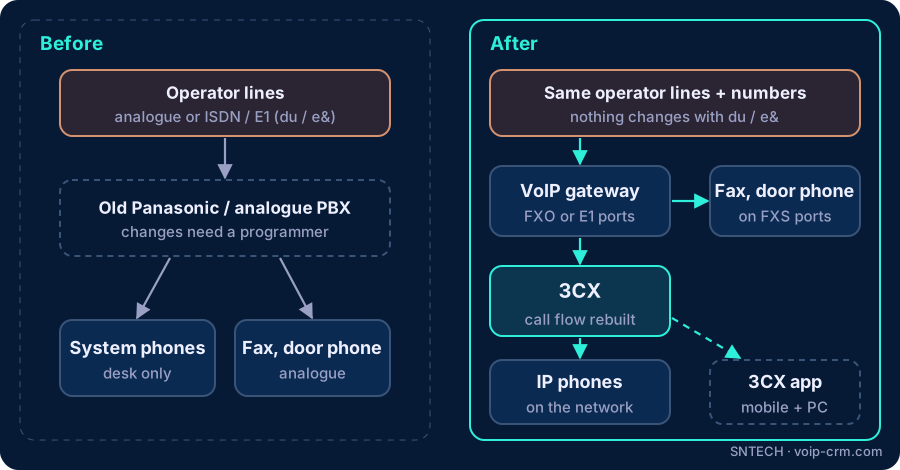
To replace an old Panasonic or analogue PBX with 3CX, you audit your current lines, extensions and call flow, connect your existing operator lines to 3CX through an FXO (or digital) VoIP gateway, keep fax machines and door phones on FXS ports, rebuild the call flow in 3CX, then switch over in one planned evening. Your phone numbers stay with your operator, so in most cases customers never notice the change, except that calls are answered better.
This guide walks through the migration the way we plan it for offices, clinics, warehouses and showrooms in Dubai and across the UAE. If you are still choosing a platform, read our 3CX vs Yeastar vs Grandstream comparison first.
Important: 3CX is installed at your UAE premises and uses lines from your own licensed operator (du or e&). SNTECH installs and supports the system; we do not provide phone numbers, lines or calling services.
Why UAE offices replace an old PBX with 3CX
Most old systems are not broken. They are replaced because they have become hard to live with:
- Spare parts and support: line cards, power supplies and system phones for older models are harder to find, and a failure can leave the office without phones.
- Nobody can change anything: adding an extension or changing the greeting needs a programmer and a site visit.
- No mobile or remote working: staff cannot take office calls on their mobile or from home.
- No reports: owners cannot see how many calls were missed.
3CX solves these with apps, a web-based admin console and built-in reports, while still working with the lines and many of the devices you already have.
Step 1: audit what you have today
Before ordering anything, write down exactly what the old PBX does. This is the step that prevents surprises on switch-over night.
| What to record | Why it matters |
|---|---|
| Incoming lines: how many, and what type (analogue lines, ISDN/E1 digital line, or already SIP) | Decides which gateway you need, or whether you need one at all |
| Main number and any direct numbers (DIDs) | Each number must be routed to the right place in 3CX |
| Extensions: who has which number, and which phones they use | Keeps staff on familiar extension numbers |
| Analogue devices: fax, door phone, lift phone, alarm dialler, cordless phones | These need FXS ports on a gateway |
| Call flow: greeting, menu options, who rings first, after-hours handling | Rebuilt in 3CX so callers get the same (or a better) experience |
| Cabling: is there network cable to each desk, or only telephone cable? | IP phones need network points or PoE switches |
Field note: in older Dubai buildings we often find the PBX programming was never documented. We take photos of the line cards and the distribution frame, and call each line to confirm which number it carries before touching anything.
Step 2: decide how to connect your existing lines
This is the heart of a PBX migration. You have two main options, and you can combine them.
Option A: keep your current lines with a VoIP gateway
A VoIP gateway converts your existing lines into a form 3CX understands. For analogue lines you use a gateway with FXO ports, one per line. For a digital ISDN/E1 line you need a digital (E1) gateway instead. Nothing changes with your operator, which makes this the quickest and lowest-risk route.
Option B: move to a SIP service from your operator
Some businesses use the change to ask their operator (du or e&) about moving the same numbers to a SIP service delivered over their internet or a dedicated link. That is an agreement between you and your licensed operator; we then connect 3CX to the service your operator provides and configure it to their settings.
FXO vs FXS: the quick explanation
- FXO port: plugs into a line coming from the operator. It lets 3CX use that line.
- FXS port: plugs into an analogue device, such as a fax or door phone. It makes that device an extension on 3CX.
We work with gateways from brands such as Grandstream and Dinstar, and check them against 3CX’s list of supported devices before ordering.
Step 3: plan phones, apps and cabling
- Digital system phones made for the old PBX usually cannot be reused with 3CX. Budget for IP phones, such as Yealink, for those desks.
- Plain analogue phones can stay temporarily on FXS ports, which helps if desks only have telephone cable.
- Apps: many staff may not need a desk phone at all. The 3CX web client and mobile app cover managers and people who move around.
- Network: IP phones need network points and ideally a PoE switch so they draw power from the cable. If the office only has old telephone cabling, plan new structured cabling or keep some analogue phones for now.
Step 4: build and test 3CX alongside the old system
We install 3CX, buy or transfer the licence through 3CX or an authorised 3CX reseller, and build everything while the old PBX keeps working:
- Extensions with the same numbers staff already know.
- The welcome greeting, menu, ring groups and office hours, including a Ramadan schedule.
- Voicemail to email and the 3CX apps on each user’s phone.
- The gateway, configured and tested with one spare or test line where possible.
Field note: if a FortiGate sits in front of 3CX, review its SIP ALG setting during this stage, following Fortinet’s guidance. It is a common cause of one-way audio that only appears after go-live.
Step 5: switch over in one planned evening
- Agree a cut-over time outside working hours, often a Thursday or Friday evening.
- Move each operator line from the old PBX to the gateway (or activate the new SIP service).
- Test every number inbound and outbound, the menu, after-hours routing, fax and door phone.
- Keep the old PBX connected and labelled for a few days as a fallback.
- Hold short training sessions on the first morning: answering, transferring, voicemail and the app.
Frequently asked questions
Can I replace my old Panasonic PBX with 3CX and keep my phone numbers?
In most cases, yes. Numbers belong to your operator account, not the PBX. 3CX can use your existing lines through a gateway, or your operator can move them to a SIP service.
What is the difference between an FXO and an FXS gateway?
FXO connects to an incoming operator line. FXS connects to an analogue device, such as a fax or door phone, and makes it an extension.
Do I have to replace all my desk phones at once?
No. Analogue phones can stay on FXS ports while you move to IP phones or apps in stages. Digital system phones usually need replacing.
Will the office be without phones during the change?
It should not be. 3CX is built and tested alongside the old PBX, and the switch is done after hours with a fallback ready.
Does SNTECH provide the new lines or numbers?
No. 3CX is installed at your premises and uses lines from your own licensed operator, such as du or e&.
Need help?
SNTECH plans and carries out PBX migrations to 3CX for businesses in Dubai, Sharjah, Ajman, Abu Dhabi, Ras Al Khaimah, Umm Al Quwain and Fujairah. Send us a photo of your current PBX and tell us how many lines and extensions you have, or book a site survey: call/WhatsApp +971 56 669 8244 or email sales@voip-crm.com. You can also download the free 3CX trial. See our 3CX phone system, IP PBX installation and IP phones pages.