

3CX call recording lets your company record selected users or call queues, keep the recordings on your own phone system, and archive older calls to storage you control, such as an office NAS or a cloud bucket. Setting it up takes minutes. Running it well takes a little planning: which calls to record, how much storage you need, who may listen, and how long you keep each call. This guide covers those basics for offices in Dubai and across the UAE.
A quick note on how the system fits together: SNTECH is a systems integrator. 3CX is installed at your UAE premises (or on your own server) and uses lines from your own licensed operator, du or e&. Recordings stay on your system and your storage, not with us or with the operator.
Why UAE businesses use 3CX call recording
Most companies switch on call recording for one of four reasons:
- Training: new sales or support staff learn faster by listening to real calls.
- Quality checks: supervisors review a few calls a week from each agent or queue.
- Disputes: when a customer and your team remember an order, a delivery time or a quoted condition differently, the recording settles it.
- Handover: a manager can listen to a difficult call before calling the customer back.
If none of these apply to a team, it usually does not need recording. Recording “everything, just in case” fills disks and creates more sensitive data to protect.
How 3CX call recording works
Each call that matches your recording rules is saved as an audio file on the 3CX server. Managers find and play them on the Recordings page of the 3CX admin console, where recordings can be searched, downloaded or deleted. Older recordings can then be archived automatically to remote storage, which frees space on the server.
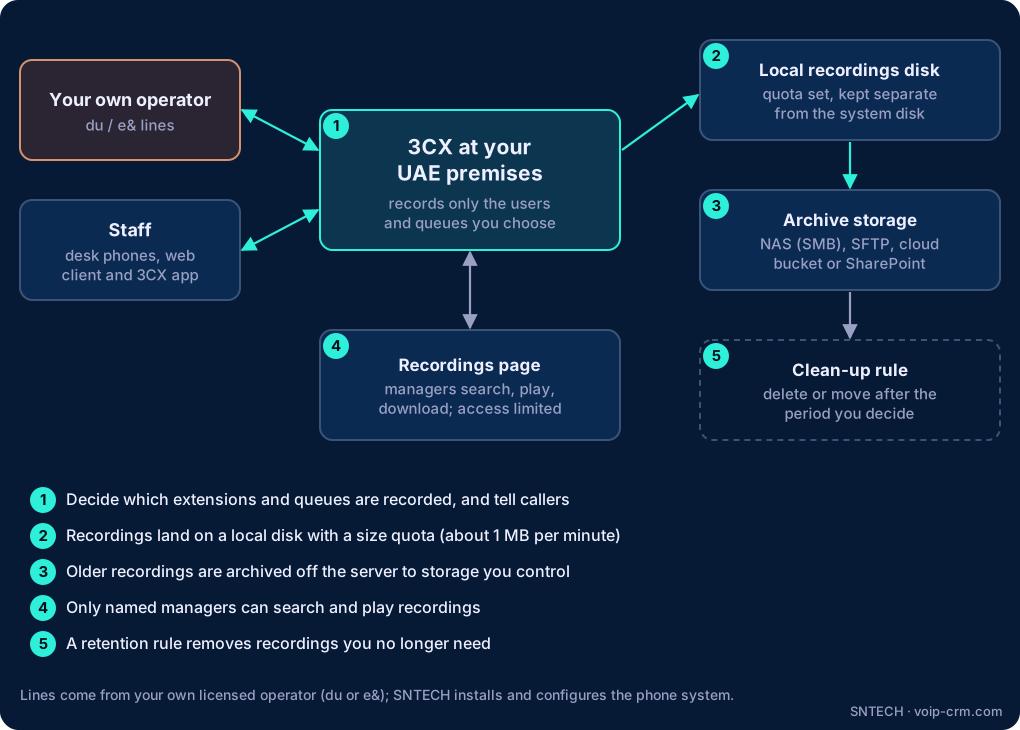
Step by step: setting up call recording in 3CX
- Choose who and what to record. List the extensions and call queues that need it, for example the sales queue and the support queue, but not the accounts team or the managing director’s line.
- Tell your callers. Add a short notice to your greeting or IVR, such as “Calls may be recorded for quality and training purposes”. In the UAE, record it in both English and Arabic.
- Prepare the storage. Give recordings their own disk or folder outside the 3CX installation folder, and set a recordings quota (see the next section).
- Turn on recording for the chosen users and queues in the 3CX admin console.
- Set up archiving to your NAS, SFTP server or cloud storage, and decide after how many days recordings move there.
- Limit access so only named managers can play and download recordings.
- Test it. Make an inbound call through your du or e& line and an outbound call from the 3CX app, then confirm both recordings appear and play clearly.
3CX recording storage: how much space do you need?
3CX estimates about 1 MB per minute of recorded audio. That makes sizing simple:
| Example office | Recorded minutes per day | Approximate storage per day | Per month (22 working days) |
|---|---|---|---|
| 3 sales staff, 1 hour of calls each | 180 | about 180 MB | about 4 GB |
| 10-agent support queue, 2 hours each | 1,200 | about 1.2 GB | about 26 GB |
| 25-agent contact centre, 4 hours each | 6,000 | about 6 GB | about 130 GB |
These are simple calculations, not measurements; your real call volume decides the numbers. Two 3CX settings protect the server:
- Quota for Recordings (GB): recording stops when this limit is reached, so the phone system never runs out of disk because of recordings.
- Disk protection: according to 3CX, when free disk space drops very low, recordings are no longer written and the administrator gets an email notification.
Both are good safety nets, but you do not want to hit them. A stopped recording is usually discovered only when someone needs that exact call.
Archiving call recordings off the 3CX server
3CX can move recordings to remote storage under Remote Data Storage & Archive. Supported location types in 3CX’s documentation include:
- Windows (SMB) share: for example a NAS in your server room. A common choice for UAE offices that want to keep data in the building.
- SFTP or FTP server: your own file server or a hosting account you control.
- Cloud storage: Google Cloud Storage or Amazon S3 buckets.
- Microsoft SharePoint / Microsoft 365: handy if your company already works in Microsoft 365.
Archiving copies each recording to the remote location and removes it from the server’s local disk. Old recordings can still be found and played, but the 3CX server stays light.
Field notes from UAE installations
- Use a service account for the NAS share. Do not archive with a staff member’s Windows login. When that person leaves and the password changes, archiving quietly stops.
- Check the archive after password or firewall changes. A new FortiGate policy or a NAS update is a common reason archiving fails without anyone noticing. Look at the 3CX event log and notifications once a month.
- On Linux 3CX servers, the local recordings folder must be writable by the phone system’s service user. We see this when a second disk is added later and mounted with the wrong owner.
- Back up the archive too. An archive on a single NAS is not a backup. Include it in your normal backup plan.
Call recording retention: how long to keep recordings
There is no single right answer; it depends on why you record. A simple way to decide:
- Training and quality checks: a few weeks to a few months is often enough.
- Orders and disputes: long enough to cover your normal complaint, return or payment period.
- Anything regulated or contractual: follow what your own legal adviser, regulator or client contract requires.
Write the period down, apply it in the archive storage (for example a lifecycle rule on a cloud bucket, or a scheduled clean-up on the NAS), and review it once a year. This article is not legal advice; take advice on your company’s own data-protection obligations in the UAE.
Who should be able to listen?
Recordings can contain customer names, addresses and payment discussions, so treat them like any other sensitive company data:
- Give playback rights only to the managers or supervisors who need them.
- Do not share admin console logins; give each manager their own account.
- If recordings are linked into your CRM, apply the same rule there.
- Restrict who can download, so recordings do not end up on personal phones and laptops.
Need help?
SNTECH plans and installs 3CX phone systems and IP PBX systems across Dubai, Sharjah, Abu Dhabi and the rest of the UAE, including recording rules, storage sizing and archiving to your NAS or cloud. If your network or NAS needs attention as well, see our network and IT support. Call or WhatsApp +971 56 669 8244 or email sales@voip-crm.com.
Frequently asked questions
How much storage do 3CX call recordings need?
About 1 MB per minute of recorded audio, according to 3CX. Ten people recording two hours a day use about 1.2 GB a day.
What happens when the 3CX recordings storage is full?
Recording stops when the quota is reached, and the system stops writing recordings if the disk is nearly full. Give recordings their own disk and archive regularly.
Where can 3CX archive old call recordings?
FTP, SFTP, a Windows (SMB) share such as a NAS, Google Cloud Storage, Amazon S3, or SharePoint / Microsoft 365.
Should we tell callers that calls are recorded?
Most UAE businesses add a short notice to the greeting in English and Arabic. Take advice on your own legal obligations; this is not legal advice.
Can calls from the 3CX mobile app be recorded?
Yes, calls made or answered in the 3CX app pass through your 3CX system, so that user’s recording settings apply. Calls from the phone’s own dialler are not handled by 3CX.